
Find who to call before making the first call
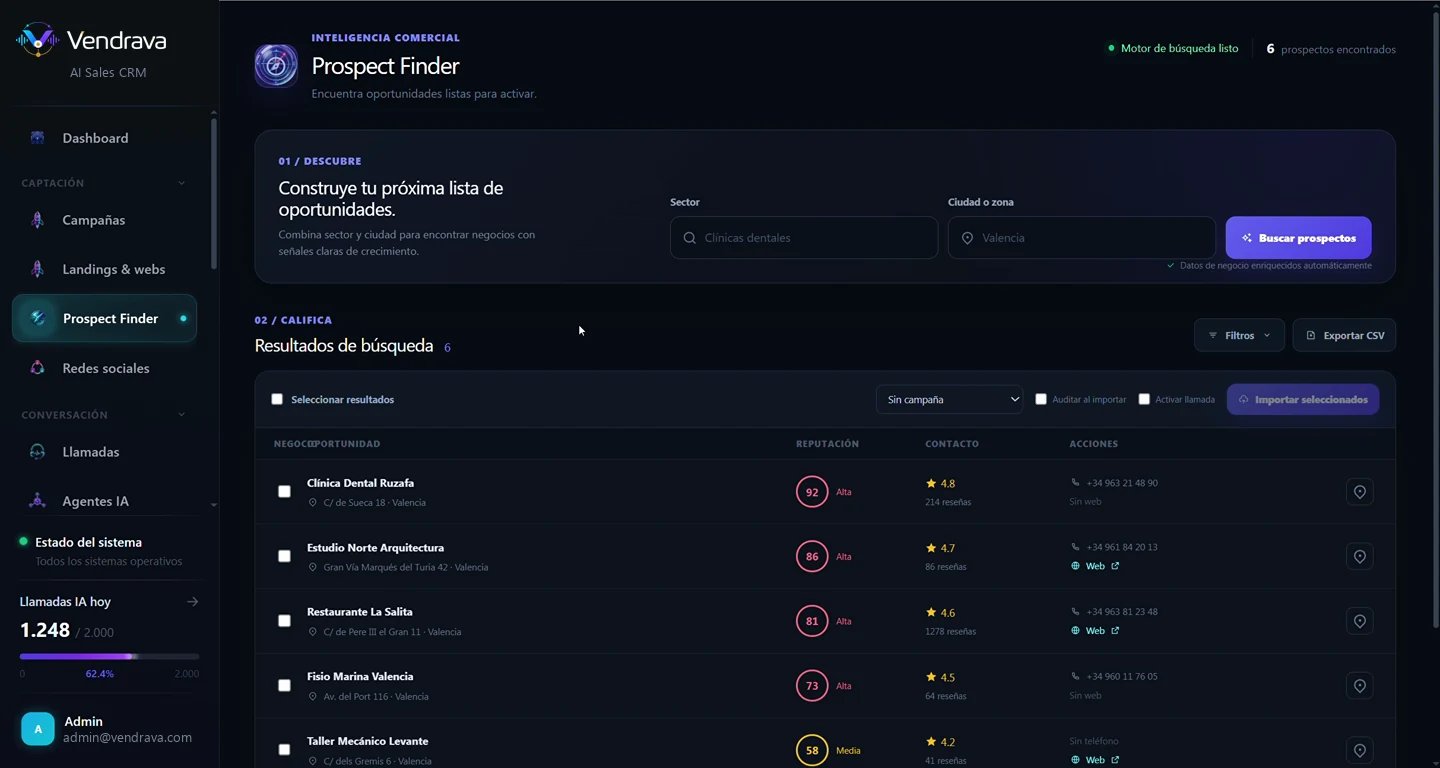
Prospect Finder searches real businesses by sector and city, scores them by reputation and opportunity signals, and turns them into a list the AI voice agent can start calling.
Most campaigns fail before anyone dials
Buying cold databases or scraping listings by hand produces wrong numbers, closed businesses and contacts with zero context. The team burns hours building lists, and the agent ends up calling people who were never going to buy.
From one search to an active campaign
Type a sector and a city. Prospect Finder returns businesses with an opportunity score, reputation, reviews, verified phone and website, and imports them straight into a campaign: one click and the AI voice agent starts calling with each business's context already loaded.
Benefits
Curated lists, not cold databases
Every result comes with an opportunity score and reputation, so you call the businesses most likely to need your solution first.
Verified, enriched data
Phone, website, address and reviews are enriched automatically, cutting wrong numbers and calls to businesses that no longer exist.
From discovery to call with zero friction
Selected prospects import into a campaign and can trigger the AI agent's call immediately, without exporting or copying data between tools.
Context for consultative selling
The agent enters every call knowing what the business is, how customers rate it and what opportunity signals it shows, not with a generic script.
Features
Search by sector and area
Combine business type and city or area to build the opportunity list for your next campaign.
Opportunity scoring
Each business gets a score based on reputation, review volume and growth signals, so you prioritize who to call first.
Automatic data enrichment
Phone, website, address and ratings are completed automatically for every result.
Direct import into campaigns
Select results and import them into a calling campaign, with optional auditing on import.
Instant call activation
Flag prospects and the AI voice agent can start calling them with each business's context.
CSV export
Take any list into your own workflow whenever you need to.
Use cases
Related modules
Frequently asked questions
Where does prospect data come from?+
From public business information sources (listings, reviews and published contact data), enriched and verified automatically at search time.
Can I filter by business type?+
Yes. Search combines sector and city or area, and results can be filtered and sorted by opportunity score, reputation or available contact data.
What does the opportunity score mean?+
It's an indicator combining reputation, review volume and business activity signals to estimate how strong an opportunity each business represents for your campaign.
Are calls to these prospects compliant?+
Campaigns respect your account's compliance settings: allowed calling hours, each country's do-not-call registries, AI disclosure and transfer to a person when appropriate.
Can I use my own lists instead of Prospect Finder?+
Yes. Prospect Finder is one more source: you can also import your contacts or connect your CRM and run campaigns on those lists.
Your next campaign starts with the right list
See how Prospect Finder finds, qualifies and activates your next customers in minutes.